ヘアーのリサイズ方法をご説明します。
まず、フォルダ内にコピーをとっておいてください。
編集不可のため、オブジェクトの名前変更は出来ません。
判りやすいよう、別に名前を付けたフォルダを作っておくと便利です。
We will explain the method of resizing hair.
First of all, please keep a copy in the folder.
Because it is not possible to edit it, the name of the object cannot be changed.
It is convenient to make the folder that gave a name separately to be comprehensible.
①髪を装着し、クリック(タッチ)してください。 画面にダイアログが表示されます。
Please Wear Hair object.And, it is clicked (touch). The dialog is displayed.

②All Primsで、全体のサイズ変更を行います。
The size is changed with All Prims.

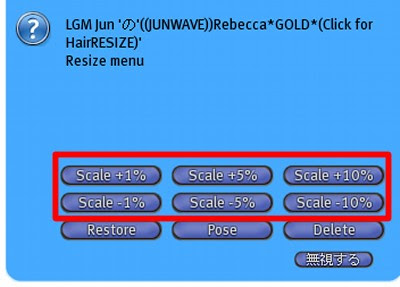
③スケールを選び、サイズを合わせます。
The scale is chosen, and the size is matched.
Restoreを選ぶと、購入時のサイズに戻ります。
It chooses and it returns to the size when buying in restore.
④続いて、スクリプトの削除をします。
Next, the script is deleted.
スクリプトの削除をすると、リサイズは出来なくなります。
リサイズが終わった後、行ってください。
It becomes impossible to resize when the script is deleted.
Please go after the resize ends.
⑤AllPrimsを選択後、Deleteを選択します。
After AllPrims is selected, Delete is select.

⑥Sure!を押すと、スクリプトは削除されます。
Sure!When is selected, the script is deleted.

リサイズスクリプトは、負担がかかる場合があります。
そのため、スクリプトの削除をお勧めしております。
The load might rest upon the resize script.
Therefore, we will recommend the deletion of the script.
 1color/80L$ (all 6colors) Fatpack/400L$ DEMO/Free
 Red Color /FREE 0L$
 He is my darling. He is cosplayer . lol


