 1color/80L$ (all 6colors) Fatpack/400L$ DEMO/Free
My Darling :)
 He is my darling. He is cosplayer . lol
has already associated for two years.
I love Jackass :) so Wonderful partner.

JUNWAVE in Innocent Pearl SIM!!

先日、グループ通知でもお伝えしたJUNWAVE Innocent Pearl店、
オープンから沢山の方にご利用頂き誠に嬉しく思っています:)
Little Cat SouthWest店は再開の準備をしてまいりましたが、
諸事情により、このまま閉店をすることとなりました。
ご迷惑をおかけして申し訳ございません。
JUNWAVEのメインストアーは Innocent Pearl店となります。
今後は、Innocen Pearl店をご利用ください。
http://slurl.com/secondlife/Innocent%20Pearl/28/207/21
The shop in JUNWAVE Little Cat SouthWest Shop closes the store as it is
though prepared the restart.
However, the store is closed by circumstances as it is.
I'm sorry for troubling you.
The main store becomes a JUNWAVE shop in Innocent Pearl.
Please use the Innocent Pearl shop.
http://slurl.com/secondlife/Innocent%20Pearl/28/207/21

Sale Information
現在、開催中のヘアー23種のセールですが、
6月いっぱいで終了することにしました:)
その後は、通常価格に戻します。
いくつかの旧作は、販売終了する予定ですので、是非この機会にご来店ください:)
Hello:)
The discount of 23 kinds of hairs ends in June 30(PDT).
Afterwards, it returns it to a usual price.
And, some hairs finish selling.
Please come to the JUNWAVE Main shop ;)
フリーヘアーは、しばらく配布すると思います:)
是非、お持ち帰りくださいね♪
*JUNWAVE MainShop*
http://slurl.com/secondlife/Little%20Cat%20SouthWest/209/105/22
6月いっぱいで終了することにしました:)
その後は、通常価格に戻します。
いくつかの旧作は、販売終了する予定ですので、是非この機会にご来店ください:)
Hello:)
The discount of 23 kinds of hairs ends in June 30(PDT).
Afterwards, it returns it to a usual price.
And, some hairs finish selling.
Please come to the JUNWAVE Main shop ;)
フリーヘアーは、しばらく配布すると思います:)
是非、お持ち帰りくださいね♪
*JUNWAVE MainShop*
http://slurl.com/secondlife/Little%20Cat%20SouthWest/209/105/22
About Resize
ヘアーのリサイズ方法をご説明します。
まず、フォルダ内にコピーをとっておいてください。
編集不可のため、オブジェクトの名前変更は出来ません。
判りやすいよう、別に名前を付けたフォルダを作っておくと便利です。
We will explain the method of resizing hair.
First of all, please keep a copy in the folder.
Because it is not possible to edit it, the name of the object cannot be changed.
It is convenient to make the folder that gave a name separately to be comprehensible.
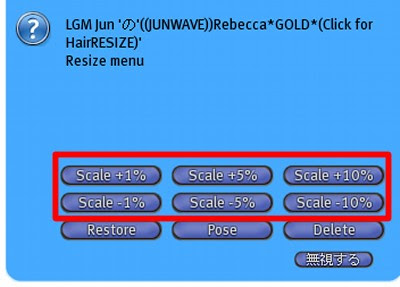
①髪を装着し、クリック(タッチ)してください。 画面にダイアログが表示されます。
Please Wear Hair object.And, it is clicked (touch). The dialog is displayed.

②All Primsで、全体のサイズ変更を行います。
The size is changed with All Prims.

③スケールを選び、サイズを合わせます。
The scale is chosen, and the size is matched.
Restoreを選ぶと、購入時のサイズに戻ります。
It chooses and it returns to the size when buying in restore.
④続いて、スクリプトの削除をします。
Next, the script is deleted.
スクリプトの削除をすると、リサイズは出来なくなります。
リサイズが終わった後、行ってください。
It becomes impossible to resize when the script is deleted.
Please go after the resize ends.
⑤AllPrimsを選択後、Deleteを選択します。
After AllPrims is selected, Delete is select.

⑥Sure!を押すと、スクリプトは削除されます。
Sure!When is selected, the script is deleted.

リサイズスクリプトは、負担がかかる場合があります。
そのため、スクリプトの削除をお勧めしております。
The load might rest upon the resize script.
Therefore, we will recommend the deletion of the script.
まず、フォルダ内にコピーをとっておいてください。
編集不可のため、オブジェクトの名前変更は出来ません。
判りやすいよう、別に名前を付けたフォルダを作っておくと便利です。
We will explain the method of resizing hair.
First of all, please keep a copy in the folder.
Because it is not possible to edit it, the name of the object cannot be changed.
It is convenient to make the folder that gave a name separately to be comprehensible.
①髪を装着し、クリック(タッチ)してください。 画面にダイアログが表示されます。
Please Wear Hair object.And, it is clicked (touch). The dialog is displayed.

②All Primsで、全体のサイズ変更を行います。
The size is changed with All Prims.

③スケールを選び、サイズを合わせます。
The scale is chosen, and the size is matched.
Restoreを選ぶと、購入時のサイズに戻ります。
It chooses and it returns to the size when buying in restore.

④続いて、スクリプトの削除をします。
Next, the script is deleted.
スクリプトの削除をすると、リサイズは出来なくなります。
リサイズが終わった後、行ってください。
It becomes impossible to resize when the script is deleted.
Please go after the resize ends.
⑤AllPrimsを選択後、Deleteを選択します。
After AllPrims is selected, Delete is select.

⑥Sure!を押すと、スクリプトは削除されます。
Sure!When is selected, the script is deleted.

リサイズスクリプトは、負担がかかる場合があります。
そのため、スクリプトの削除をお勧めしております。
The load might rest upon the resize script.
Therefore, we will recommend the deletion of the script.
Trouble by resize script
当店でも使用しているリサイズスクリプトに障害が出る場合がございます。
リサイズスクリプトを含んだオブジェクトを装着していると、テレポートが正常に出来ない障害が発生することがあります。
必ずしも、起こるわけではないようです。現在、原因を調べております。
対処法といたしましては、リサイズスクリプトを削除する方法です。
まず、必ずコピーを取ってから開始してください。
No/MODなので名前の変更は出来ません。
判りやすいようにフォルダを作り、そちらへコピーすることをお勧めいたします。
コピーは、フォルダー内で対象のオブジェクトを選択し、右クリック→コピー→貼り付け
まず、サイズを合わせておいてください。
下記の作業を行うと、リサイズは出来なくなります。
対象のヘアーを装着し、1度タッチします。

右上のダイアログメニューから、AllPrimを選択します。
一括で全てのスクリプトを削除出来ます。

Deleteを選択します。

Sureを押すと、スクリプトは削除され、オブジェクトは通常のものになります。
尚、これはJUNWAVEのヘアーの場合であって、
他店の同じスクリプトでも仕様が異なっている場合があります。
リサイズスクリプトのヘアーを装着する際は、SIMへの負担もありますので
サイズを変更後スクリプトを削除したのち、使用してください。
The trouble might go out to the resize script used also in our shop.
The trouble not to be able to normalize the teleport might occur if the object that contains the resize script is installed.
It seems not to happen necessarily. It studies into the cause now.
The action method is a method of deleting the resize script.
First of all, please begin after it copies it without fail.
Because it is No/MOD, it is not possible to change in the name.
I will recommend making the folder like being comprehensible, and copying it to that.
The copy selects the object of the object in the folder, and is right-clicking → copy → putting.
First of all, please match the size.
It becomes impossible to resize when the following work is done.
The hair of the object is Wear,
and it resize your head size.
Selection to AllPrims.All the scripts are deleted.
Selection to Delete.
It becomes a usual object if it consents. There is no script.
This is hair of JUNWAVE.
The same script of another shop might be different the specification.
There is a load to SIM, too and use it, please after deleting the script after the size is changed when you install the hair of the resize script.
リサイズスクリプトを含んだオブジェクトを装着していると、テレポートが正常に出来ない障害が発生することがあります。
必ずしも、起こるわけではないようです。現在、原因を調べております。
対処法といたしましては、リサイズスクリプトを削除する方法です。
まず、必ずコピーを取ってから開始してください。
No/MODなので名前の変更は出来ません。
判りやすいようにフォルダを作り、そちらへコピーすることをお勧めいたします。
コピーは、フォルダー内で対象のオブジェクトを選択し、右クリック→コピー→貼り付け
まず、サイズを合わせておいてください。
下記の作業を行うと、リサイズは出来なくなります。
対象のヘアーを装着し、1度タッチします。

右上のダイアログメニューから、AllPrimを選択します。
一括で全てのスクリプトを削除出来ます。

Deleteを選択します。

Sureを押すと、スクリプトは削除され、オブジェクトは通常のものになります。
尚、これはJUNWAVEのヘアーの場合であって、
他店の同じスクリプトでも仕様が異なっている場合があります。
リサイズスクリプトのヘアーを装着する際は、SIMへの負担もありますので
サイズを変更後スクリプトを削除したのち、使用してください。
The trouble might go out to the resize script used also in our shop.
The trouble not to be able to normalize the teleport might occur if the object that contains the resize script is installed.
It seems not to happen necessarily. It studies into the cause now.
The action method is a method of deleting the resize script.
First of all, please begin after it copies it without fail.
Because it is No/MOD, it is not possible to change in the name.
I will recommend making the folder like being comprehensible, and copying it to that.
The copy selects the object of the object in the folder, and is right-clicking → copy → putting.
First of all, please match the size.
It becomes impossible to resize when the following work is done.
The hair of the object is Wear,
and it resize your head size.
Selection to AllPrims.All the scripts are deleted.
Selection to Delete.
It becomes a usual object if it consents. There is no script.
This is hair of JUNWAVE.
The same script of another shop might be different the specification.
There is a load to SIM, too and use it, please after deleting the script after the size is changed when you install the hair of the resize script.